What to do if Google Maps is giving the wrong directions to your business!
This past week for some reason Google Maps decided to change the route to a client's business. Despite the business being located off the main road, Google Maps was having people turn on the street before the business. Then down another side road then our favorite part; they were suggesting people to park then literally walk across water to get there! I don't know about you but a swim is not something i want to be apart of my driving experience.
Before starting make sure your exact business location is pinned correctly. If it's in the wrong location move it and wait a few days to see if that was the reason the directions are incorrect.
How to report a problem with directions to your business on Google Maps
On Desktop Computer
- Sign into your Google account
- Go to Google Maps online
- In the "search box" enter your business
- Then click "directions"
- Next type in a "starting point"
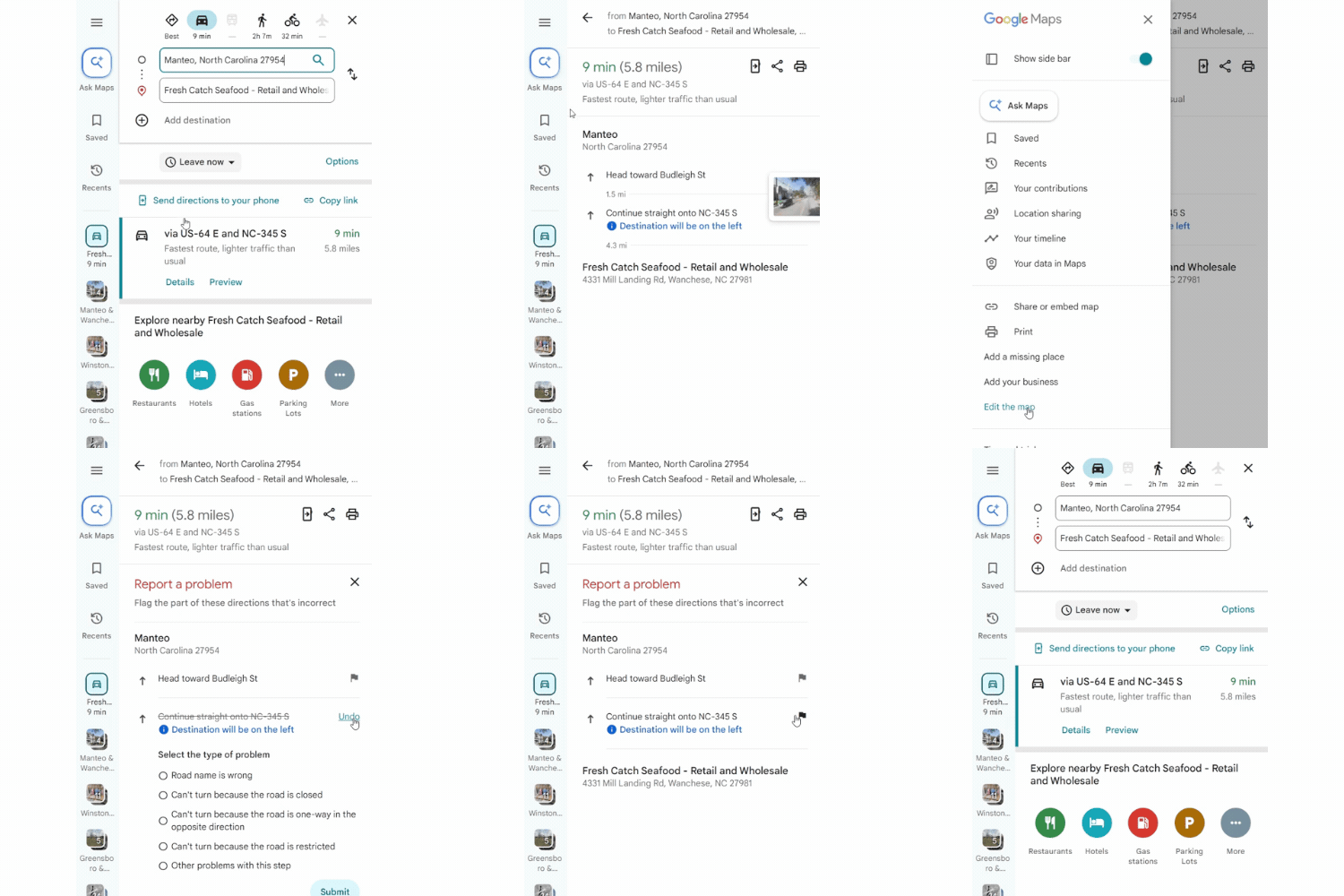
- Click "details" on the route and find the incorrect direction
- Click the three lines in the upper left corner and "open the menu"
- Click "edit the map"
- Click the "flag" next to the incorrect direction
- Select the reason the direction is wrong, fill in any additional information and then click "submit'
It might take a few days to over a week for the directions to be updated. To get the directions changed faster, have 3 to 5 other Google accounts report the same problem to Google Maps.
